
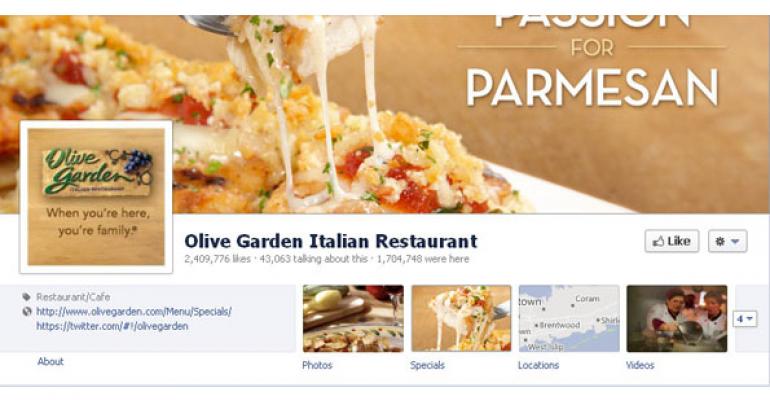
In the most fundamental terms, the Great Facebook Migration of 2012 represents a move by the digital hangout to standardize the look and feel of every Business Page on its network. Essentially, the online community wants every business on its site to be able to express what’s happening with its brand right now—as well as the heritage behind that brand—all on a single page.
“The new functionality really does appear to have been introduced with brands in mind,” says Pete Goold, managing director, Punch Communications, a marketing firm specializing in search engine optimization.
Adds Marcie Everett, interactive marketing manager, Red Robin International:“We believe the continued focus on brand-friendly developments will help us enhance the engagement of our guests.”
Fortunately, getting from here to there is fairly easy, as long as you know the way. Here are the guideposts: 1. Get acquainted with your new start page.
Probably one of the most far-reaching impacts of Facebook’s upgrade is that the design format of every business start page—or the page your visitors land on when they first visit you on Facebook—is now standardized.
Essentially, every restaurant is now required to run a large banner image, also known as a cover photo, across the top of its start page. “The large cover photo alone presents a fantastic branding opportunity,” says Peter Lee, c.e.o., WireWalkersVA, a web design and marketing firm.
Alexis Aleshire, director of public relations and social media at Hooters, agrees: “I love the addition of the cover image. It is a great opportunity highlight the brand in a unique way and make the page more engaging for fans.”
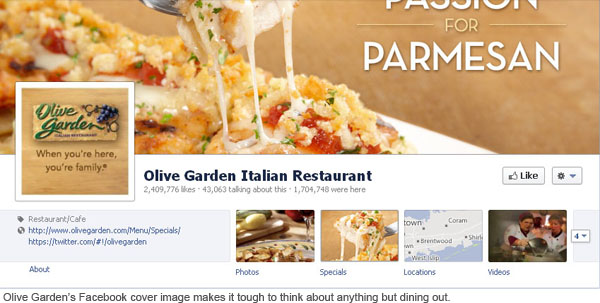
Indeed, a number of restaurants are making the most of the cover image, including Olive Garden, whose cover image makes it difficult to think about anything else but dining out, and Norm’s, which conveys the brand’s image as a down-home place to eat.
Beneath, you’ll be asked to work with a number of boxes, organized in a two-column format, which will showcase activity on your page. Some boxes will feature your activity—posts and announcements made by your company, for example. And other boxes will feature visitor activity—their posts, any “likes” they’ve posted on your page and similar activity.
Running down the extreme right margin of your start page, Facebook is also mandating that you create a timeline. This new feature is essentially a vertical list of hotlinked dates, which lead to posts and images chronicling your restaurant’s history.
“Being able to host your history on the timeline is a huge advantage for brands, especially for Hooters,” says Hooter’s Aleshire. “We have such an interesting history, it is great to be able to tell our story here and mark milestones.”
2. Use care selecting a banner image.
Facebook sees the banner image as an opportunity for you to give visitors a feel for your brand. So it’s prohibiting businesses from using a giant image simply to sell stuff. In practice, that means you won’t be able to post an image with a “50% off” come-on, or populate the image with phrases like “limited time offer” or “2-for-1.” Ditto for including other info, such as your e-mail address, web address or mailing address. Facebook prohibits embedding that kind of info in the banner image.
For optimum display, Facebook recommends your banner image measure 851 by 315 pixels.
3. Create a mandatory timeline.
If your restaurant has a rich, interesting heritage, you’re in luck. With the aforementioned Timeline running down the extreme right margin of your page, you’ll be able to tell your business’ story in words and images. In practice, this will mean selecting a series of “Milestones” in your restaurant’s history, which will appear as hotlinked dates stacked vertically on the right side of your start page.
If you or your marketing person excel at this kind of creative storytelling, Timeline may offer your restaurant an excellent opportunity to connect with visitors. “In the end, even those who are skeptical about the concept will find that the new Timeline offers greater connectivity and branding opportunities,” says WireWalkersVA’s Lee.
4. Pin important news/posts up top.
A new feature, post-pinning enables your restaurant to anchor a post near the very top of your start page for up to seven days. This is perfect for companies looking to add staying power to important company news. Plus, it can keep a special offer or sale top-of-mind for visitors for an extended period. Such posts, like all posts, can also include images. And the posts can also be highlighted.
“These new options enable us to showcase our current promotional burger or contest that we want our followers to see when visiting our Facebook page,” says Red Robin’s Everett. “One great example is our recent ‘$5 off $20 Facebook Offer’ for our guests, which was done by using the highlight option to create a larger and more visible post than the typical update. The offer definitely generated a buzz amongst our followers, and using the highlight feature allowed them to quickly and easily identify and obtain the offer.”
Other restaurants, like Red Lobster, use post-pinning to keep news about ongoing contests front-and-center. And IHOP leverages the tool to tie reminders about upcoming holidays as opportunities to eat out.
See more tips
5. Hide/delete unwanted posts.
Warning: With the redesign, old unwanted posts may automatically be incorporated into your Timeline by Facebook. Fortunately, Facebook offers a tool that will enable you to hide or delete old posts that reflect badly on your business, or simply need to be removed.
6. Be aware of “visitor graffiti."
One of the dicier elements of Facebook’s new start page is that it is so chillingly efficient at tracking what Facebook friends are saying about your company. For good or bad, all those opinions will show up in an activity box just below your banner photo.
Essentially, your company may spend tens of thousands or even millions of marketing dollars to ensure your start page on Facebook looks and feels just right. But all those considerable efforts can be undone in a nanosecond if my friend Wilbur has a bad experience with your restaurant, and posts an especially nasty review about what happened while he is on Facebook. Unfortunately, the way the new start page is designed, Wilbur’s thumbs-down review will pop up, front and center, in an activity box on your page.
Adding insult to injury, right next to Wilbur’s review, Facebook may also post a picture of Wilbur’s smiling (or snarling) face.
Of course, the reverse is true. If my friend Madeline absolutely adores her experience at your business, and posts that review while on Facebook, her glowing accolade will also probably also pop up on your company start page any time any of Madeline’s Facebook friends stop by.
As you might imagine, the graffiti factor has hoards of businesses squirming both ways.
7. Consider private messaging.
As a kind of counterbalance to the graffiti factor, Facebook has introduced company/visitor private messaging with this latest upgrade. The feature enables your company to handle tricky customer service problems via private messaging. It’s a welcome relief to scores of restaurants who previously were often forced to publicly wrestle customer complaints and pubic relations nightmares on Facebook walls.
“The feature we really love and use frequently is the option for guests to send us private messages,” says Red Robin’s Everett. “Should a comment be posted that we would like to follow up on and take that specific conversation off our main wall, the user now has the option to share privately information he or she may not feel comfortable sharing in a public forum.”
Of course, if you’d rather not handle customer complaints in this way, Facebook enables you to eliminate private messaging altogether.
8. Say goodbye to custom landing pages.
In another controversial move, the latest Facebook redesign no longer allows businesses to create custom landing pages. Every visitor who clicks to your Facebook presence is automatically routed to your start page. No exceptions.
More than a few businesses are grousing about this particular mandate, given that many had spent considerable time and money coming up with stunning custom landing pages that worked just fine, thank you, under Facebook’s previous design format.
9. Check out the new admin panel.
Virtually every aspect of your Facebook presence can be managed and monitored from the new Admin Panel. Here, you can work with page and privacy settings and engage in private messaging with visitors. You can also monitor visitor activity with Admin Panel, including who’s “Liking” your brand.
10. Get more help.
There’s plenty of help available for companies looking to migrate to Facebook's new look and feel at Facebook’s help center.
Joe Dysart is an Internet speaker and business consultant based in New York City.


